


Password Manager Comparison
Password managers store login credentials and provide a convenient way to access and manage your passwords. In this article, we provide a comprehensive comparison of the most widely used password managers.
Contents
- Selection Criteria
- Brief Overview of LastPass
- Brief Overview of 1Password
- Brief Overview of Dashlane
- Brief Overview of KeePass
- Brief Overview of Bitwarden
- Summary
- Conclusion
Password Managers
Selection Criteria
First, we will outline the key criteria that should generally be considered when choosing a password manager. Regardless of the password managers presented in this article, you should pay attention to the following points when selecting the right product:
-
Security: Security is an important factor when choosing a password manager. The password manager should use strong encryption to protect your passwords and data. Some password managers also offer two-factor authentication (2FA) as an additional security option.
-
Ease of use: The password manager should be easy to use and navigate. The application should have a clear layout so that you can quickly and easily find and manage your stored passwords.
-
Cross-platform availability: The password manager should be available on different operating systems and devices. It is important that you can access and manage your passwords from different devices and platforms.
-
Synchronization: The password manager should provide the option to synchronize passwords across different devices. This is especially important when you use multiple devices to access your passwords.
-
Features: A good password manager should offer a wide range of features, such as the automatic generation of secure passwords, the ability to organize passwords into categories, the option to store notes and other information, and the ability to automatically enter secure passwords for specific websites and applications.
Some password managers currently available on the market that meet these criteria include 1Password, LastPass, Dashlane, KeePass, and Bitwarden. However, before choosing a password manager, you should carefully review the features and characteristics of each product to ensure that it meets your needs and requirements.
We do not know every password manager available on the market, but in this article we compare the most important password managers that we have used or evaluated so far.
Brief Overview
LastPass
LastPass is a password management tool developed by GoTo, formerly LogMeIn Inc. It is a cloud-based password manager that enables users to generate and store secure passwords for different websites and applications. LastPass is available on various operating systems and platforms, including Windows, macOS, Linux, iOS, Android, and most common web browsers.
Advantages:
Security: LastPass provides strong encryption (AES-256 encryption with PBKDF2 SHA-256, as of 2023) and other security features such as two-factor authentication (2FA) and a security dashboard that informs users about the security of their accounts.
Ease of use: LastPass is easy to use and provides a user-friendly interface that allows users to manage their passwords quickly and easily.
Automatic form filling: LastPass can automatically complete forms and enter user information.
Password sharing: LastPass allows users to securely share passwords with other users without directly revealing the passwords themselves.
Synchronization: LastPass automatically synchronizes user accounts across different devices, allowing users to access their passwords from any device.
Disadvantages:
A paid Premium version is offered with additional features, such as access to passwords from an unlimited number of devices and password sharing with an unlimited number of users. Some competing products include these features in their standard pricing. LastPass has also experienced several security incidents in the past, with the most recent one occurring only a few months ago. In recent days, the vendor has published further information about how the incident occurred and its impact. Source: [4]
Overall, LastPass is a robust and reliable password manager that offers a broad range of features and is valued by many users for its high level of security and ease of use.
Brief Overview
1Password
1Password is a password management tool developed by AgileBits that enables users to securely store passwords and other confidential information. 1Password is available on various operating systems and platforms, including Windows, macOS, iOS, Android, and most common web browsers.
Features
-
Password generation: 1Password can automatically generate secure passwords for users that are difficult to guess and protected by strong encryption.
-
Automatic form filling: 1Password can also automatically complete forms and enter user information.
-
Organization: 1Password enables users to organize and group their passwords into different categories so that they can be found more easily.
-
Synchronization: 1Password automatically synchronizes user accounts across different devices, allowing users to access their passwords from any device.
-
Security: 1Password provides strong encryption and other security features, such as two-factor authentication (2FA), which help users keep their accounts secure.
-
Password sharing: 1Password enables users to securely share passwords with other users without directly revealing the passwords themselves.
-
Data breach monitoring: 1Password offers a feature called Watchtower, which informs users about security incidents or data breaches that may affect their accounts. (similar to https://haveibeenpwned.com/)
Advantages
-
Ease of use: 1Password is easy to use and provides a user-friendly interface that allows users to manage their passwords quickly and easily.
-
Availability across different platforms: 1Password is available on different operating systems and platforms, allowing users to access their passwords from any device.
-
Security: 1Password provides strong encryption and other security features that help users keep their accounts secure.
Disadvantages
- Not open source—customers therefore have to rely on vague marketing promises.
- Some of the marketing statements raise questions. For example, I find the statement that the encryption key consists of a "Secret Key and Account Password" suspicious. In other words, they know one half of the AES key. Other statements mention that the Secret Key is stored in the apps: "Unlock 1Password without entering your Secret Key every time. It’s stored in the 1Password apps and browsers you’ve used to sign in to your account on 1Password.com.*" [1]. The documentation does not explain how the key is stored there. I am also puzzled by the following footnote: "*You won’t be able to find your Secret Key in Safari unless you sign in to your 1Password account at least once every 7 days." [1]. This raises concerns. Not only might I lose access to my data—possibly not only as a Safari user—if the provider ceases operations, but there also appears to be some form of connection between the locally stored Secret Key and the server, which makes me skeptical.
- From our perspective, another disadvantage of 1Password is the lack of an on-premises solution, meaning an application that stores data locally rather than in the cloud. Such a solution existed a long time ago and was actively used by us, but unfortunately it was discontinued in favor of the cloud-based version. However, this is a highly subjective disadvantage. For many other users, a cloud solution is an advantage because it is easier to use.
Brief Overview
Dashlane
Dashlane is a password manager developed by Dashlane Inc. that helps users securely store passwords, payment information, and other confidential data. Dashlane is available on various platforms, including Windows, macOS, iOS, and Android.
Features
-
Password generation: Dashlane automatically generates secure passwords for users and stores them securely in the application.
-
Automatic form filling: Dashlane can automatically enter user information into forms to simplify the login process.
-
Synchronization: Dashlane automatically synchronizes passwords and other information across different devices, allowing users to access their data from any device.
-
Organization: Dashlane allows users to organize and group their passwords into different categories so that they can be found more easily.
-
Security: Dashlane provides strong encryption and other security features such as two-factor authentication (2FA), which help users keep their accounts secure.
-
Password sharing: Dashlane allows users to securely share passwords with other users without directly revealing the passwords themselves.
-
Dark web monitoring: Dashlane can scan the internet and the dark web for stolen data in order to warn users at an early stage if their information has been compromised through a hack or data breach.
Advantages
-
Ease of use: Dashlane is easy to use and provides a user-friendly interface that allows users to manage their passwords quickly and easily.
-
Availability across different platforms: Dashlane is available on different operating systems and platforms, allowing users to access their passwords from any device.
-
Security: Dashlane provides strong encryption and other security features that help users keep their accounts secure.
Disadvantages
- Not open source
- One disadvantage of Dashlane is that it offers a paid version with additional features, such as sharing passwords with multiple users and accessing passwords from an unlimited number of devices.
Brief Overview
KeePass
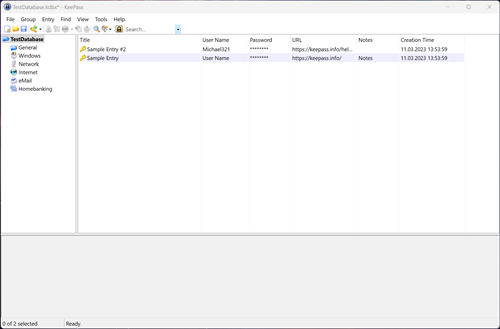
KeePass is an open-source password manager developed by Dominik Reichl. It is available on various platforms, including Windows, macOS, Linux, Android, and iOS.
Advantages and Features
-
Password generation: KeePass can automatically generate secure passwords for users and store them securely in the application.
-
Synchronization: KeePass synchronizes passwords and other information across different devices, allowing users to access their data from any device.
-
Organization: KeePass enables users to organize and group their passwords into different categories so that they can be found more easily.
-
Security: KeePass provides strong encryption and other security features such as two-factor authentication (2FA), which help users keep their accounts secure.
-
Extensibility: KeePass can be extended through plug-ins that provide additional functionality, such as browser integration and integration with cloud storage providers.
Some of the advantages of KeePass include:
-
Open source: KeePass is open-source software, which means that users can inspect and modify the application’s source code. This increases the transparency and trustworthiness of the application.
-
Free of charge: KeePass is available free of charge, making it more accessible to users than paid password managers.
-
Security: KeePass provides strong encryption and other security features that help users keep their accounts secure.
-
Availability across different platforms: KeePass is available on different operating systems and platforms, allowing users to access their passwords from any device.
Disadvantages
One disadvantage of KeePass is that it may not be as user-friendly as other password managers and requires a certain level of technical knowledge to use effectively.
Brief Overview
Bitwarden
Bitwarden is a cross-platform, open-source password manager developed by 8bit Solutions LLC. Bitwarden provides various features that enable users to securely manage and share their passwords and other confidential information.
Advantages and Features
-
Password generation: Bitwarden can automatically generate secure passwords for users and store them securely in the application.
-
Synchronization: Bitwarden synchronizes passwords and other information across different devices, allowing users to access their data from any device.
-
Organization: Bitwarden enables users to organize and group their passwords into different categories so that they can be found more easily.
-
Security: Bitwarden provides strong encryption and other security features such as two-factor authentication (2FA), which help users keep their accounts secure.
-
Extensibility: Bitwarden can be extended through plug-ins that provide additional functionality, such as browser integration and integration with cloud storage providers.
Some of the advantages of Bitwarden include:
-
Open source: Bitwarden is open-source software, which means that users can inspect and modify the application’s source code. This increases the transparency and trustworthiness of the application.
-
Free version: Bitwarden is available in a free version that includes most of the features required by the majority of users.
-
Security: Bitwarden provides strong encryption and other security features that help users keep their accounts secure.
-
Availability across different platforms: Bitwarden is available on different operating systems and platforms, allowing users to access their passwords from any device.
-
Affordable pricing: Compared with other password managers, Bitwarden’s paid version is very affordable.
Disadvantages
One disadvantage of Bitwarden is that it does not support offline synchronization, meaning that users must be connected to the internet in order to access their passwords. In addition, some features, such as integration with certain cloud storage providers, are available only in the paid version.
Password Managers
Summary
| Feature | 1Password | Dashlane | KeePass | Bitwarden |
|---|---|---|---|---|
| Strong encryption | (AES-256 with PBKDF2 SHA-256) |
(AES-256) |
(AES-256) |
(AES-256) |
| Password generation | ||||
| Synchronization | ||||
| On-premises | ||||
| Open source |
Password Managers
Conclusion
Choosing a password manager is a purely subjective decision—it depends on your individual needs and requirements. This article is intended to explain at least the most important criteria so that you can make a sound decision with the right considerations in mind. The following conclusion therefore reflects our personal assessment.
All providers claim to support "strong encryption" and specify AES-256. This is correct in the sense that AES-256 is strong and is currently considered secure [2]. As of March 2023, AES-256 has not been broken, regardless of what some media outlets claim [3], and it is unlikely to be broken in the foreseeable future—even with the emergence of quantum computers, which the media sometimes suggest will trigger an absolute cryptographic apocalypse. This issue applies more directly to asymmetric encryption methods, especially RSA. However, this does not appear to be relevant to the password managers listed here, at least based on the functionality I was able to identify.
HOWEVER ... no matter how good an encryption algorithm may be, and regardless of how "strong" and "secure" it is said to be, the implementation ultimately matters as well. Imagine that someone develops an ultra-secure fingerprint scanner but installs a perfectly smooth glass surface directly in front of it. It works perfectly for an ordinary user, but an attacker only needs to examine the fingerprints left on the glass surface, and the security is defeated. This is a highly simplified analogy—in reality, it is even worse [6].
The handling of the key within the software is not the only relevant factor. Various additional features in a password manager may also create security problems. This happened recently with KeePass, for example [5]. The difficulty with strong encryption and its implementation is that even security experts or software developers may find it difficult to assess from the outside.
For this reason, the label "strong encryption" is not enough for us. It is also important that the software is available as open source . With the appropriate software development expertise—and far too much spare time—you could then verify the correctness of the implementation yourself. Alternatively, we can trust that others have already done so, which is fortunately not uncommon with open-source software.
The points described above have led us to currently try KeePass. It may not have the most attractive interface, but it gives us the fewest concerns regarding its security features.
Before that, we used 1Password, among other products. However, AgileBits’ cloud-only strategy led us to switch. Why no cloud? The reason is simple: it is the same issue as the "strong encryption" label. Ultimately, it remains a marketing claim as long as I am unable to verify it myself. The cloud further reduces my ability to assess whether the implementation is correct. You are completely dependent on the provider, and the recent developments surrounding LastPass demonstrate why blindly trusting a provider may not be a good idea [4].
However, the choice of the right password manager should primarily be based on which product you can use most effectively and which one best meets your requirements. If I choose the most secure solution but cannot operate it correctly, it may ultimately be less secure than a solution that focuses primarily on convenience and usability.
Sources
[1] 1Password Encryption Key Details: https://support.1password.com/secret-key-security/
[2] AES is safe!: https://www.clickssl.net/blog/256-bit-encryption
[3] AES Cracked: https://www.theinquirer.net/inquirer/news/2102435/aes-encryption-cracked (Broken)!
[4] LastPass Hack https://support.lastpass.com/help/what-data-was-accessed
[5] See CVE-2023-24055, in which attackers could potentially have accessed protected content through the local export functionality.
[6] See https://www.ccc.de/de/updates/2014/ursel
[7] Overview of Hacked Password Managers: https://password-managers.bestreviews.net/faq/which-password-managers-have-been-hacked/